Official Players Guide · NES
Slade Collins
and the Secret of Tahawus
Chapter 1: “Lucille”
Buttons
| Button | Walking around | In a menu or dialog |
|---|---|---|
| D-Pad | Move one square at a time. Hold two directions to move diagonally. | Move the cursor. |
| A | Talk, read or search if something is in front of you. Otherwise, use the item armed to A. | Arm the highlighted item to A. Speed up text, then turn the page. |
| B | Use the item armed to B. | Arm the highlighted item to B. Speed up text, then turn the page. |
| Start | Open or close the Selection Menu. | Skip the opening scene. Continue from Game Over or the chapter card. |
| Select | Open or close the Map screen. | Move the cursor on the title screen and the file list. |
Arming items to A and B
There's no fixed attack button. You choose what goes on A and what goes on B. You start with your Fists on A and nothing on B.
- Press Start to open the Selection Menu.
- Move the cursor to an item in the grid.
- Press A to put it on A, or B to put it on B.
The item moves out of the grid onto that button, and whatever was there goes back into the grid. Pressing A or B on an empty grid slot takes the item off that button. An empty button does nothing when you press it.
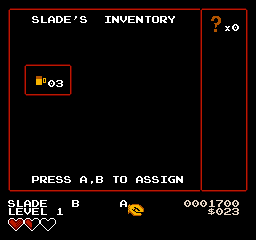
When you pick up the 3-LB Hammer, it goes straight onto A as long as your Fists are still there. If you put something else on A, arm the Hammer yourself from the menu.
Talking and reading
Walk up to a person, sign, bookshelf or object, face it and press A. If there's nothing to talk to, A uses your A item instead. In the Two Times Club, you need to be facing the bookshelf, sign or coffee machine you want to use.
In a dialog box, A or B finishes the line, and the next press turns the page. On a YES/NO question, the cursor starts on YES, A picks the answer it's on, and B answers NO.
The Map screen
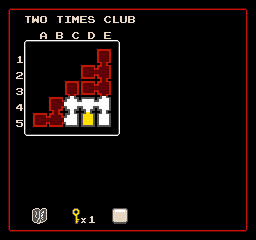
Press Select to see the map of where you are: Utica, a building or the club. Select, B or Start closes it. The map only shows places you've been, and the square you're in right now is highlighted in yellow.
- Pick up the Dungeon Map in the club's Card Room and the whole club shows up at once.
- In the club, the map also shows how many keys you're carrying.
- The Macartovin building has a basement. Press Up and Down on its map to switch floors.
Health
Slade starts with three full hearts. Each heart is four quarters, and every hit takes at least a quarter. Beating Tony gives you a heart container, which adds a fourth heart.
- Getting hit knocks you back and makes Slade flash for one second. Nothing can hurt him while he flashes.
- Opening a menu or reading a dialog pauses that flashing, so you don't lose your safe second by checking the menu.
- At half a heart or less, a warning beep repeats until you heal.
Healing
- Travel Mug: holds up to three drinks, and each one refills you to full. It won't pour if you're already full, so you can't waste one.
- Refills: Joe sells a drink for $15. The club has two free coffee machines, and each one needs about a minute before it pours again.
- Enemy drops: beaten enemies sometimes drop health, more often when you're hurt.
Scoring
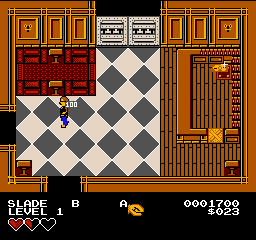
Your score is on the right side of the HUD. When you beat an enemy in the club or the Macartovin building, its points float up out of its body. When you pick up an item or a stack of cash in the club, or find the ignition coil or the Brackish DVD, Slade holds it over his head for a second before the points count up. Items and cash on the club's floors glint once the room is clear.
| What | Points |
|---|---|
| Any regular enemy (thugs, rats and the rest) | 100 |
| Garage Bruiser | 200 |
| Tony Two Times | 300 |
| Breaking a crate | 10 each |
| Cash pickups (not money dropped by enemies or crates) | 10 per dollar |
| Small key | 100 |
| Ignition coil | 100 |
| A grenade found on a bookshelf | 200 |
| Grenade cache (Stockroom) | 400 |
| Club membership card | 1,000 |
| Heart container | 1,000 |
| Brackish DVD | 5,000 |
You can't move while points are counting up, so let the count finish before you walk on.
Saving and dying
Saving
Talk to Joe and he opens a menu: CHAT BUY SAVE. Move the cursor with Left and Right, pick with A, or close it with B. Choose SAVE, then pick one of the three files.
- Joe stands behind the counter at Cafe Cappelli.
- Once you have the club card, a second Joe waits in the Two Times Club Lobby.
- The music stops while the file list is up. When you see NOW SAVING, don't turn off or reset the game.
- If Joe says I'M OUT OF PAGES, the save didn't work. Try again.
Dying
At zero health you get the GAME OVER screen. Press Start to keep going.
- If you've saved, the game loads your file. You start just inside the room you saved in, with everything you had at that point, including your score.
- If you haven't saved yet, you start a fresh game on the street where the game began. The opening scene doesn't play again.
Save with the Joe in the club Lobby before you go deeper into the club. If you die, you'll start in the Lobby instead of back at the Cafe.
The file list
Each file shows the level and the score it was saved with, or EMPTY. To delete one, choose LOAD GAME on the title screen, pick ERASE A FILE, choose the file, and press A again to confirm. B backs out.